
NordicTrack A2350 PRO

Overview
UPDATE: This review of the NordicTrack A2350 PRO treadmill is obsolete since this model is no longer being sold. Read our NordicTrack reviews to learn more about the current models.
———————–
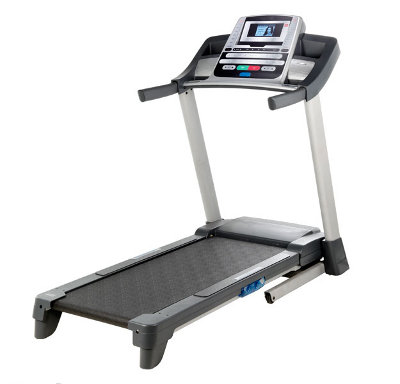
The NordicTrack A2350 PRO is a great choice for a home treadmill, especially if you’re a walker. This model is the improved 2010 version of Nordictrack A2350, an older model we reviewed a couple of years ago.
This equipment offers an attractive set of features that make it a notable machine for Nordictrack, and the price talks for itself.
For $700, this treadmill is a great selection, but if you expect it to do wonders, you should just go look for a superior model (over $1,000).
Read more about the NordicTrack A2350 PRO and check out its advantages and disadvantages in the “Conclusions” section.
Specifications
Click Specifications to see detailed model info
Speed : 0-12 MPH 1-TOUCH
Incline : 0-10%
Motor : 2.5 CHP Commercial Durx
Belt : 20’’ X 60’’ (50.8 cm x 152.4 cm) The belt length is perfect for tall runners.
Supported user weight : 325 LB (147 kg)
Warranty : The equipment comes with a lifetime warranty for frame and motor and 1 year guarantee for parts and labor.
Features
Display:
The NordicTrack A2350 PRO is one of the most famous treadmills of Nordictrack due to its price/features balance.
The display offers great feedback which makes workout much more effective. By being in continuous contact to clear statements of your progress, workouts become both more enjoyable and more productive.
Regardless of the type of workout you choose, the display will permanently keep track of essential elements that you need to be aware of:
– Incline level
– Speed
– Elapsed time
– Walked or run distance
– Your pace in minutes/ mile or kilometer
– Approximate number of burned calories
– Heart rate

Workouts:
– 10 Perfomance Workouts
– 6 Weight Loss Workouts
The NordicTrack A2350 PRO features 16 preset workouts, of which 6 calorie workouts and 10 performance workouts. These workouts represent a very effective way of losing weight or just keeping fit. The 20 inches wide treadbelt offers more room to walk, run or jog.
To use one of the preset workouts, you should follow these steps:
Insert the key
Select the desired workout by using the Increase/ Decrease buttons next to the Enter button. After highlighting Workouts, choose your category, press Enter and select the workout.
After the selection has been made, the display will give you the name, duration, maximum speed setting, maximum incline setting and a general profile of the speed settings
Remember that a distance workout doesn’t give you the duration of the program
Press Start and the treadmill will adjust to the speed and incline settings of the workout.
The preset workout holds to major segments: speed settings and incline settings. During workout, the display will show your progress
Note that the calories you will burn depend on your weight. The estimated goal of burned calories that the workout offers remains theoretical. It all depends on your weight.
Choose the desired display mode to follow your progress.
Monitor your heart rate, if you wish to.
When the workout ends, remove the key.
Preset workouts control the speed and incline automatically.

iFit LIVE MODULE – Optional, Not Included
This module is optional, but it’s a strong feature and we recommend you to buy it. More details about the iFIT module’s features are listed in this article (iFIT Workouts)
Heart Rate Reading:
through handlebars
You can easily monitor your heart rate by using the handgrip pulse sensors. With your hands clean, stand on the foot rails and hold your hands still on the contacts. After the pulse is detected, your heart rate will be displayed. For more accuracy, stand still for another 15 seconds.
Remember this info is just pure workout feedback. This is not a medical device, just a standard feature.
Stereo Sound System:
iPOD compatible
To enjoy your favorite tracks or books or whatever keeps you motivated, you can insert an audio device into the console. Check if the audio wire if fully plugged in. Press Play on your audio device and select the desired volume by pressing Increase/ Decrease.
Information Mode
The information Mode is highly important for treadmills’ maintenance due to its permanent display of the total distance of the walking belt and total number of hours that the treadmill has been in use. With this info you can know when it’s time to lubricate the belt, check if the belt is off-center or slips when you walk on. You should do these check-ups every 2-3 weeks.
From this menu you also select if you want to see display in English or Metric form (miles or km).
To select this mode, hold Stop, insert key and then release the Stop button. When activated, the mode will display the information.
To change the unit of measurement, select English for Meters and Metric for Kilometers.
When the iFit life Module is plugged in correctly in this mode you can check the Wifi Status. If a USB is plugged in, the message will be “USB Status”. When there is no device plugged in, the message will be “No Module Detected”.
How to Fold the Treadmill
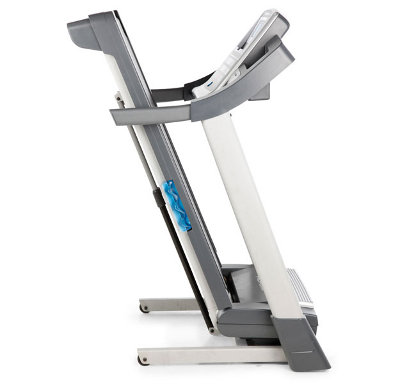
This is a folding treadmill, a powerful advantage.
Prior to folding, adjust the incline to the lowest position. Remove key and unplug the power cord. Make sure you are powerful enough to lift 45 Ibs./ 20kg by yourself.
Hold the metal frame and raise it about half way to the vertical position. Raise it until the latch knob locks in the storage position. Remember to protect the stored treadmill from temperatures above 85 degrees F/ 30 degrees C.
Conclusions
The NordicTrack A2350 PRO presents an attractive pack of features, compared to its price. It has been added significant improvements from the predecessor model, A2350 which make it a strong competitor in this price range.
This is a treadmill we really felt comfortable with because of its attractive features, but even so we can only recommend it for short term light exercises: like 1-2 hours of jogging daily.
It is a great choice for walkers, but it’s not built for intensive endurance. This is very normal as you can’t demand professional performances from a $700 equipment.
It has an attractive workouts range. For example, we appreciate the 10 Performance workouts. They are very useful for those who train only at home and don’t know where to start.
The 6 Calorie workouts are useless. Don’t use those because the treadmill doesn’t count the calories burned accurately, not even 50%. It doesn’t have a personal profile enabled so you can insert personal info, like weight (key info to count calories J).
But, you could buy the iFIT LIVE MODULE because it would offer you a more challenging workout environment, especially if you just want to be in shape and take care of your body. The workouts offered through this module are personalized to match you, your eating habits and goals. Read more here.
You don’t have the best motor, the treadmill could be noisy and the Sound Ssystem is poor. Plus the warranty for parts is ridiculous. Only 1 year means this treadmill is not built to last long.
But if you just have a limited budget right now and you want a treadmill to start getting in shape, it’s a good choice. This is a beginner’s treadmills which fits your needs at the start-up of your running career.
***The production of this model is stopped***

 Back to Top
One Response to NordicTrack A2350 PRO