
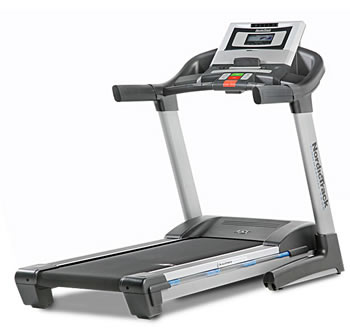
NordicTrack Commercial ZS

Overview
UPDATE: The NordicTrack Commercial ZS treadmill is no longer being sold. Take a look at our latest NordicTrack reviews to learn more about the current models.
————————
NordicTrack Commercial ZS is a product of Icon Health and Fitness. This model comes with an improved design, but otherwise it resembles a lot with NordicTrack Commercial 1500.
Commercial ZS is a 2009 model. But we found it available at a good price in 2010. Its reputation is not that good, still we had a nice experience.
We invite you to read next about the Commercial ZS and check out the Conclusions section for a better view of the pros and cons of this model.
Specifications
Click Specifications to see detailed model info
Speed : 0-12 MPH You can use the Quick Buttons on the console to change Speed during workout.
Incline : up to 12% Same as incline, you can use the Quick Buttons from the console to change incline value.
Motor : 3.0 HP Commercial
Maximum User Weight : 350 lbs/ 160 kg
Belt : 20 x 60 inches/ 41 x 152 cm
Warranty : lifetime for frame, 12 years for motor and 1 year for parts and labor
Features
Display Info
This treadmill allows you to monitor progress with 8 displays, according to which information you want to access. Press Display repeatedly to reach the desired display. The display is easy to read and follow.
Apart from elapsed time, walked/ run distance, approximate number of burned calories, speed, incline, walking/ running pace and heart rate, you’ll have a workout history of speed settings, an animation of a runner and a visual equalizer that shows volume.
You can also personalize console settings according to your workout preferences.
Workouts
The NordicTrack Commercial ZS offers 28 preset workouts, of which 9 Weight Loss, 9 Aerobic Fitness Workouts and 10 Performance Workouts. If you want more diversity, you can choose out of the 4 Create & Save workouts and make your own.
To go to a preset workout, you have to press one of the 3 categories of preset workouts until you reach the one you want. Each has 1 minute segments. At the beginning of the workout, the display will show you the name, duration, maximum incline setting and maximum speed setting.
Start the belt. You’ll have a profile of the speed settings on the display. Select the display you want and monitor your progress. You can measure your heart rate for better results.

Or, if you’re looking for some variety, create your own workout. Select a Custom Workout by pressing Custom repeatedly until you get to the name of the workout you’re looking for. Start the belt and begin the workout. You can personalize the console settings at the beginning of the workout.
And when you want to pump it up even more, you can use an iFit card (optional), which you insert into the console and press iFit Increase/ Decrease until you get to the workout you want. Start the belt and select a display mode to monitor progress. When you’re done, remove the card.
Heart Rate Monitor
The handlebars incorporate sensors that can monitor your heart rate at any time. Or, you can opt for the hands-free chest strap that you purchase separately.
We recommend you buy it. It will be useful.
Fan
– Incorporated
Folding options
You can fold the treadmill for space-saving storage. But it’s heavy and you will need assistance.
Sound System
: iPOD compatible
This treadmill has nice entertainment features. To listen to your favorite music or a nice audio book, first plug in your MP3 player, or CD player or an iPOD. Follow instructions and enjoy the perks of this high-quality sound-system that includes high-end speaker and subwoofer. The sound is very clear.
iFit Workouts
– Optional
This is another model ICON produces with another optinal iFIT Card Slot. To use it you need to buy the cards separately and this will cost you more.
The programs you find on the card are very good. Jillian Michaela is the main author.
There are many details to share about this option. We wrote an article which we strongly invite you to read before making a decision. See the iFIT Workouts.

Conclusions
The Commercial ZS model incorporates decent quality components, strong features and a nice, refined console. The 3.0 HP make the motor strong and reliable. It delivers really intense, exhausting yet efficient workouts. For the price we offered, it’s a bargain, especially for those interested in light jogging or walking.
Then, there’s the belt. The belt is comfortable because it is large (for a $1000 model) and it provides great motion and comfort. The cushion system does the trick and increases comfort during workout.
Users who weigh up to 350 lbs/ 160 kg can enjoy the features of this treadmill and the cushioning system that absorbs impact on your joints and knees and keep your body injury-free and fit. But from our point of view it will work only for the short term. For a long term model, you need to search for a more expensive treadmill.
The workout selection compresses 28 preset workouts and in addition, 4 Create & Save workouts that allow you to build your own according to your personal goals. And when you feel the need of novelties, you can insert your iFit card that you purchase separately and spice up your workouts. The treadmill can take it.
Heart rate reading is easy and comfortable. Just grasp the handlebars or attach the chest strap to your body for workouts that require your hands. But the chest strap you buy it separately.
You can cool off by turning on the fan. This will make your workouts much more enjoyable, and so will the sound system.
This model incorporates a premium sound system. The sound quality is decent. Plus you can use the iPOD. This is something we always look to have in a treadmill.
There are also disadvantages. For example, the warranty is poor. The treadmill we reviewed was new, but honestly we are reluctant to believe it will last for more than a year. Especially if 2-3 people use it daily.
Plus, the workouts inserted in the console don’t keep count of your personal details, so results are inaccurate.
But for $1000, the Commercial ZS is a good machine and we recommended it for short term use, light jogging or walking.
*** this model is no longer produced***

 Back to Top
7 Responses to NordicTrack Commercial ZS