
FreeMotion X3 Incline Trainer

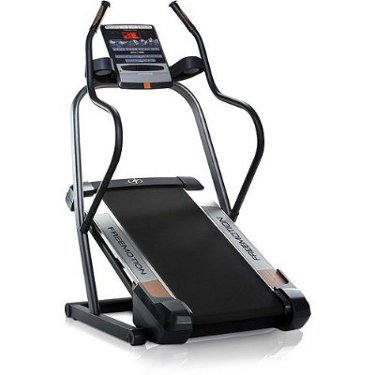
Overview
IMPORTANT: This review of the FreeMotion X3 Incline Trainer is obsolete since this model is no longer mass produced and better treadmills are available on the market in 2012. Read our reviews to learn more about these current models.
The FreeMotion X3 Treadmill Incline Trainer is a machine that will rock your workouts!
As far as efficiency goes, this incline trainer is amazing. Still, as far as entertainment and other details (such as warranty, price, weight of the unit or the impossibility to fold it), you may want to think twice before buying it.
Read more about this incline trainer and look closely into our conclusions. They will give you a clear view on the advantages and disadvantages.
Specifications
Click Specifications to see detailed model info
Speed : up to 10 MPH 1-Touch options are included. Same for Incline.
Incline : up to 40%
Motor : 2.8 HP
Belt : 20’’ x 51’’ (51 cm x 130 cm)
Maximum User Weight : 250 lbs
Technical Dimensions : Length: 67" (171 cm) , Width: 36" (91 cm), Height: 58" (148 cm) ,Machine Weight: 215lbs (98 kgs)
Warranty : lifetime warranty on motor and 1 year for parts and labor
Features
Display Info
When the manual mode is selected, you can choose out of four displays. The display mode of your choice controls the shown workout information which can be:
– Elapsed time
– Walked/ run distance
– Number of vertical feet you have climbed
– Approximate number of burned calories/ hour
– Speed
– Incline
– Approximate number of burned calories
– Heart rate
Heart Rate Readings: through Handles
You can monitor your heart rate by using the handgrip pulse sensor. You have to stand on the walking platform, grasp the metal contacts on the handrails and hold them still for 10 seconds. If you want more accuracy, continue for another 15 seconds. It’s almost impossible to use during workout.
Workouts
The console features nine 1-step calorie workouts and a random workout generator that gives you a new workout every time you exercise.
To use the 1-step calorie workouts, you must first press one of the 1 Step Calorie Workouts buttons until the name of the desired workout appears. When a workout is selected, there will be a trail shown on the side of a mountain. Workouts are made of segments with specific speed and incline settings.

For the random workouts, you have to select one by pressing the Random Trail button. To select the approximate number of the calories you wish to burn, press one of the 1 Step Calorie Workouts buttons and the incline trainer will create a new workout according to random speed and incline set-ups. After selection, the display will give you the duration of the workout and the number of vertical feet you will climb. You will also see the trail.
iFit Workouts
Optional
This treadmill has the iFit feature that enriches the workouts selection. Of course, you must purchase it separately, but it will give you the satisfaction of a complete workout.
If you want to use an iFit card, you must first insert it into the console, but make sure it is in a position that keeps metal contacts faced-down and into the iFit slot. Then select a workout using the Increase and Decrease iFit button. When the workout is selected, you’ll have the following information on the display: name, max incline, duration and max speed. Every iFit workout is divided into one-minute segments. You have speed and incline pre set for each segment.
Read more about this option in the iFIT Workouts article.
Fan
Included
Folding Option
NOT included
The FreeMotion X3 Incline Trainer doesn’t fold, so if you consider it a major disadvantage, maybe you should look for another type of equipment. No Incline Trainer folds.
Sound System
If you like the motivation of your favorite tunes, just connect the MP3 player, CD player or any other player to the console. Make sure the audio wire is fully plugged in. Press Play on your player and adjust the volume as you want.
Information Mode
This is a feature that keeps track of the total distance run/walked on the belt and the total number of hours the treadmill is used. You can choose miles or kilometers to measure distance and also you can also control the contrast of the display.

Conclusions
The FreeMotion X3 Incline Trainer is a machine that we recommend to anyone who greets some incline challenge to lose weight.
The 30% incline will keep you sweating on the treadmill. This is a fantastic machine for those who want to lose three times the calories burned on a flat surface. Yeap, you won’t be leaving the running belt too sun.
But you should know this is not a machine for tall people. Its incline capacity is quite high, which is of course its main advantage. But taller people may find it difficult, since at the highest incline level is about 3 feet off the floor and the belt is very short, so I’m sure you can see the problem.
The motor is also a kicker and not to mention the comfortable running surface. This incline trainer will keep your joints and knees beyond safe. It’s great to workout and not feel the impact of road running and this incline trainer does just that. But don’t forget to lubricate it.
Of course, the incorporated fan is what saves many workouts. If your body is comfortable, you can be sure you’re in for a long ride. And who doesn’t want some refreshing air when training? Especially when training on this machine.
Its workouts are quite requiring. They are not that various but they challenge you, even – and pay attention!- even without the iFit cards! Sure, if you want extra training, you’ll get it generously with the iFit, but this machine itself can exhaust you quickly. You should try them first, and then consider purchasing the iFit cards.
The sound system is great news, it’s just that the speakers don’t work that well. It’s better if you use your player without the use of the incline trainer.
A notable flaw is that this machine is so hard to move. It is significantly heavy, don’t even think about lifting it by yourself. First of all, you won’t be able to do it anyway, and second of all, you may hurt your back. And note that the incline trainer doesn’t fold.
Pay attention also to where you buy it. On the FreeMotion Website, this machine costs $2,000 (Under no circumstances you should pay this money, keeping count that the same manufacturer produces NordicTrack Incliners with same benefits and better features).
You can find better offers, such as $1,400 (this is the highest you should go). For this price, the machine will give you the training benefits you seek. Still, it has its flaws that you may want to carefully analyze before making the purchase decision.

 Back to Top